Remotely monitoring the bilge pump
In an earlier post, I wrote about the Teltonika router that provides Internet access, WiFi, and remote monitoring access on our narrowboat Four Dimensions.
In this post, I explain how one wire connected to the router enables remote monitoring of the bilge pump. More specifically it enables an alert by SMS (text message) to my phone if the bilge pump activates.
Teltonika routers have a programmable digital input and a programmable digital output (programmable here means you can configure the input and output from the graphical user interface - you don't need to do any coding).
Four Dimensions, like many boats, has an automatic bilge pump, triggered by a float switch, as well as by a push switch on the engine control column (next to switches for the headlight, horn, and navigation lights). I've wired this automatic bilge pump to the digital input on the router (more detail below), and configured the router so that if the pump starts or stops, the router sends me a text message. This is the most basic level of remote monitoring, but it is a vital one, because if your boat is taking on water and the pump runs, you really want to know, even if you're in bed several hundred miles away.
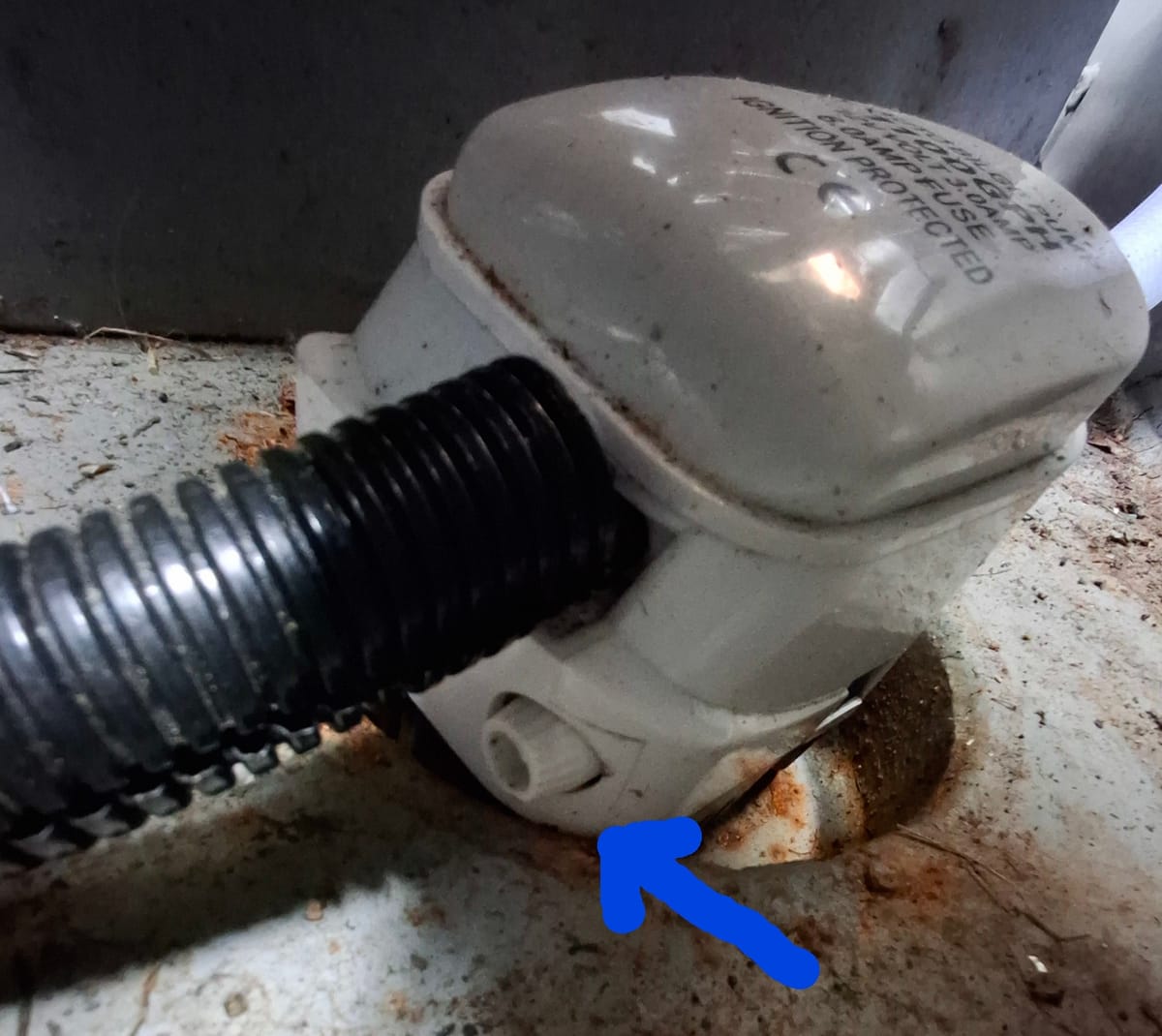
The direct and simple connection from bilge pump to router (only one 12V wire!) means that messages about this don't depend on my Raspberry Pi computer or any software running on it. Provided the router is running and it has a mobile network connection, the message will get through. I always test this before leaving the boat – the bilge pump has a test knob that allows you to rotate the float switch and run the pump briefly (briefly because without water to pump, damage will occur if you run the pump for too long). It took me a while to realise this test knob existed as someone had told me you have to invert the pump to test the float switch, which is not the case if your pump has a test knob. Twisting this knob verifies that the float is free to move (not stuck with mud, for example), and it activates the switch, or will do if the switch is working. If all is well, my phone gives a distinctive ping a moment later when the SMS arrives (the router phone number is set to use a different tone to any other number on my phone). I also test the manual push switch on the engine control column when we arrive on the boat, before cruising. This switch was the easiest place for me to connect a wire to, as you'll understand from the description of the wiring below.
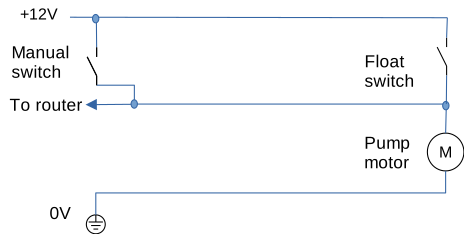
The bilge pump wiring took a bit of figuring out, but essentially there are three wires to the pump. The electricians had used three core mains flex for the run from the control column to the bilge pump, so the wire colours were confusing. The way it works is this. One wire carries a +12V supply to the supply side of the float switch, one wire is the earth return from the pump motor, and the third wire runs from the manual switch on the engine control column to the pump motor and the motor side of the float switch. This third wire (the middle one in the diagram) is the crucial one, because it is energised (at +12V) either by pressing the switch on the engine control column, or by the float switch: either of these actions causes the pump motor to run. The circuit diagram above illustrates this. This third wire can be used as a 'sense' wire, as it is always energised when the bilge pump motor is running, regardless of which switch has been operated.
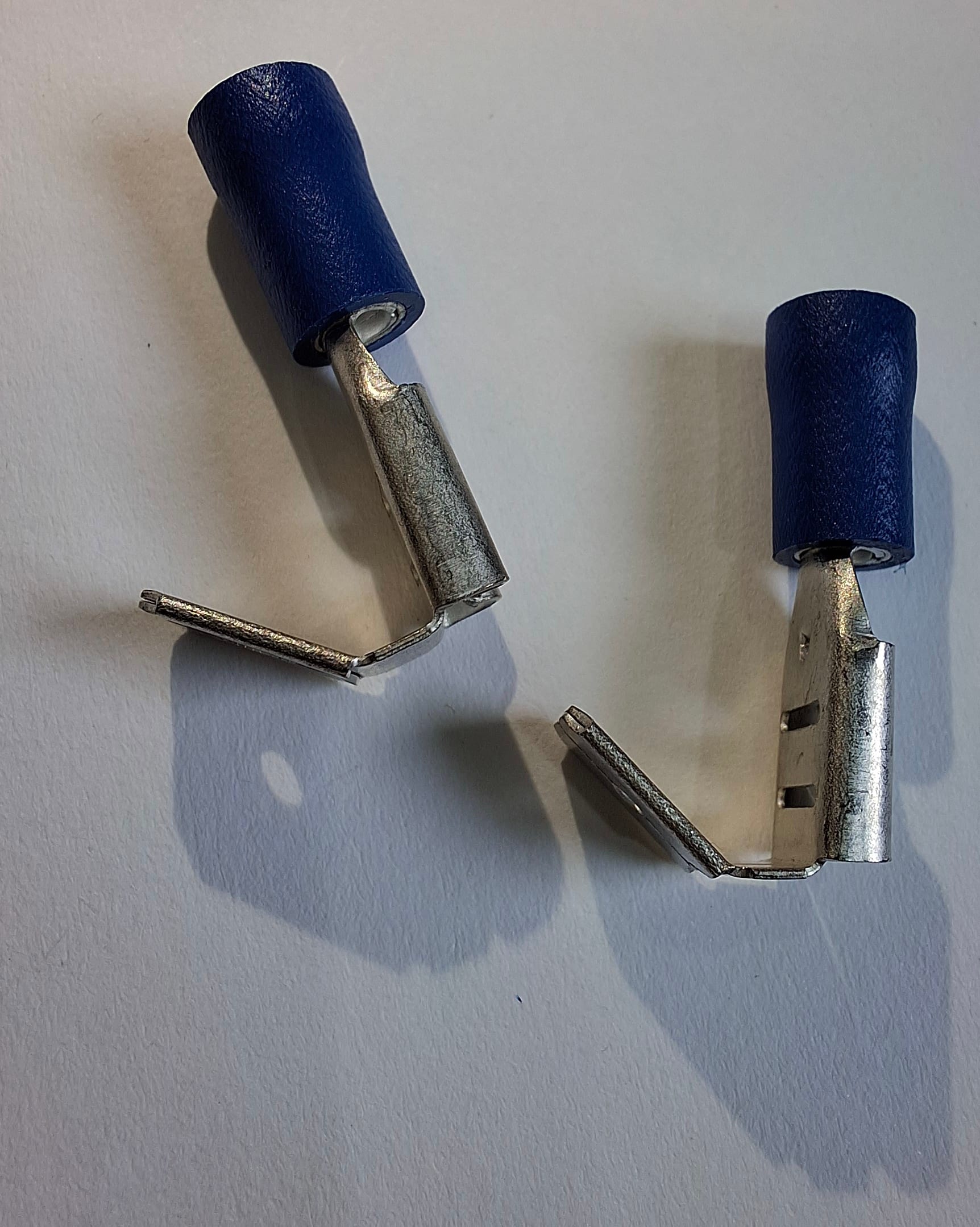
To monitor the bilge pump remotely, I needed to connect that third 'sense' wire to my router's digital input. The engine control column switch turned out to be the easiest place to connect to this wire, rather than connecting to the wiring in the bilge. I made the connection with a double spade connector (see photo – Halfords sell them), which allows you to piggyback off an existing spade, without needing to crimp your new wire to an existing wire. I ran the wire through a small diameter flexible duct right to the router terminal box, and connected to the router digital input inside the terminal box.
Only one wire was needed (no ground return), because the router is already connected to the boat ground/hull, and so is the bilge pump. So the earth wire was already in place.
After connecting the new wire, it was just a question of configuring the router through the web interface so that a change on the digital input would trigger an SMS message to my phone, and then testing it by running the bilge pump for a few seconds.
Installing one wire took me quite a lot of time, both to understand the wiring, to work out where and how to connect it, and then to physically route the wire and flexible ducting. But the effort was worth it to know that wherever I am, if the bilge pump is triggered, I'll get a text message on my phone to tell me.
[Updated on 21 April 2026 to correct the wording 'mobile data connection' to 'mobile network connection' - SMS messages don't depend on a mobile data connection.]